GPL WordPress Theme, GPL Website Thane, GPL Website Vadodara, GPL Website Varanasi, Premium GPL WordPress Themes Morocco, Premium GPL WordPress Themes Pakistan, Premium GPL WordPress Themes Turkey, WP Gpl theme, WP PLUGIN
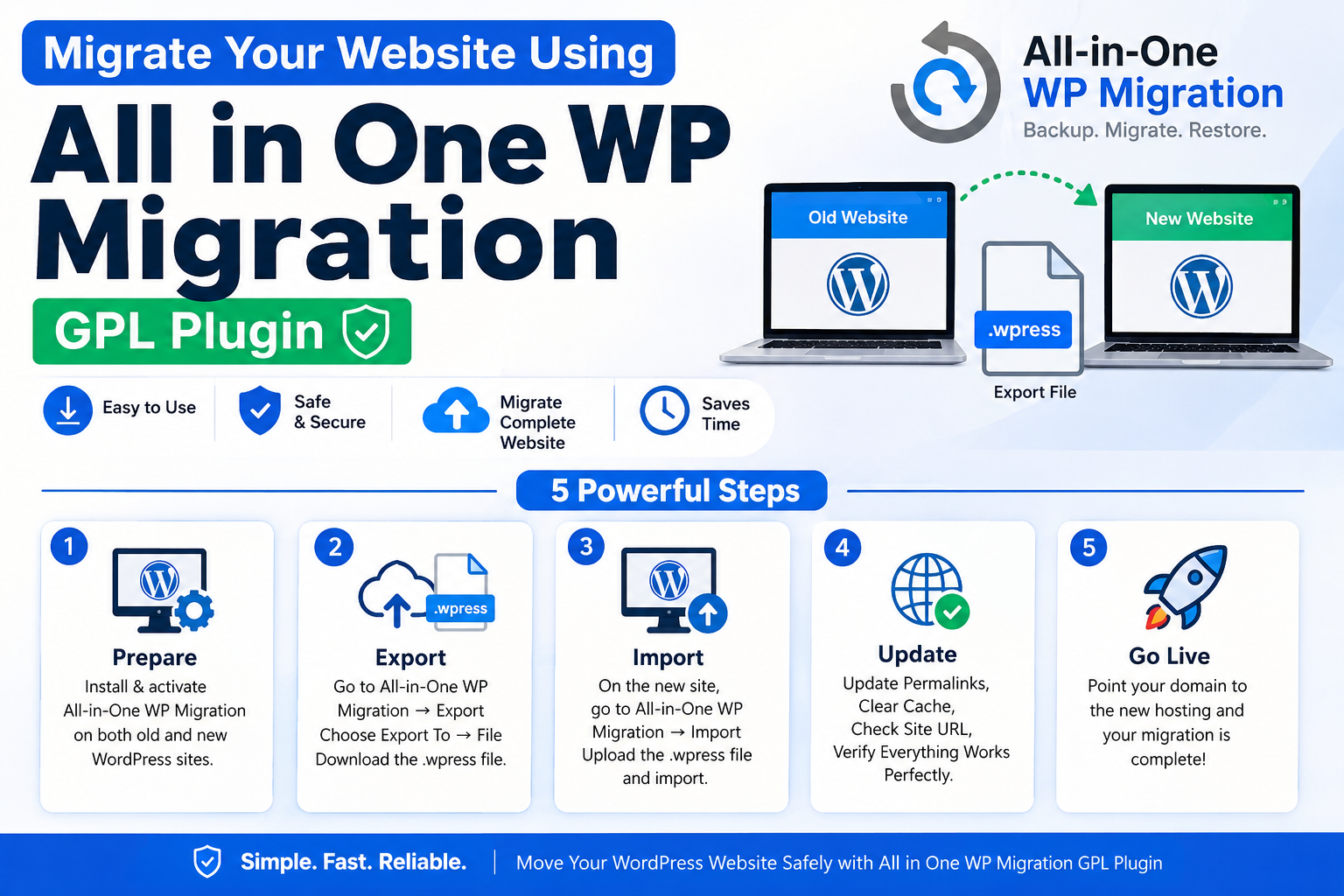
How to Migrate Your Website Using All in One WP Migration GPL Plugin – 5 Powerful Steps

Moving a WordPress website from one host to another, or from a staging site to a live domain, can feel intimidating — especially if you’re not a developer. That’s where the WP migration plugin GPL version of All in One WP Migration comes in. It’s one of the most popular tools for exporting and importing entire WordPress sites in just a few clicks, and through GPLPro you can access its premium extensions at a fraction of the usual cost. In this guide, we’ll walk you through the exact steps to migrate your website safely.
What Is All in One WP Migration?
All in One WP Migration is a plugin that packages your entire WordPress site — database, media files, plugins, and themes — into a single export file. You can then import that file into a new WordPress installation, and your site is restored exactly as it was, without manually copying files or running SQL queries.
Why Use the GPL Version from GPLPro
The free version of the plugin has file size limits for exports. The premium extensions (like the Unlimited Extension) remove this restriction, allowing you to migrate large websites with big media libraries. Through GPLPro’s membership, you get access to these premium extensions without paying for a separate individual license.
Before You Start: Pre-Migration Checklist
- Take a full backup of your current site (just in case)
- Make sure your new hosting/domain has WordPress already installed
- Check your PHP upload limits on the new server — larger sites may need higher limits
- Note down your current site’s plugin list and any custom settings
Step-by-Step Guide to Migrate Your Website
1. Install the Plugin on Your Old Site
Download All in One WP Migration (GPL) from your GPLPro dashboard and install it on the website you want to migrate, just like any other plugin — via Plugins → Add New → Upload Plugin.
2. Export Your Website
Go to All in One WP Migration → Export, choose “File” as the export destination, and the plugin will generate a single export file containing your entire site.
3. Set Up the New WordPress Site
On your new hosting or domain, install a fresh copy of WordPress. Install the same All in One WP Migration plugin on this new site as well.
4. Import the Export File
Go to All in One WP Migration → Import on the new site, upload the export file you downloaded earlier, and let the plugin restore your database, media, plugins, and theme automatically.
5. Update Permalinks and Check Everything
Once the import finishes, go to Settings → Permalinks and click Save (this refreshes your URL structure). Then check your pages, images, and forms to confirm everything migrated correctly.
Common Migration Issues and Fixes
- File size too large: Use the Unlimited Extension (available via GPLPro) to bypass the default export size limit
- Broken images after import: Clear your browser and site cache, then reload
- Site looks unstyled: Update permalinks and check if any custom CSS files failed to import
Why Choose GPLPro for This Plugin?
Instead of paying for the All in One WP Migration premium extensions individually, GPLPro gives you access to this and 4000+ other premium WordPress themes and plugins under one affordable membership — genuine, virus-free files with regular updates and 24/7 support.
👉 Ready to migrate your site the easy way? Get All in One WP Migration and its premium extensions through GPLPro Membership.
🌐 Visit: www.gplpro.net
🎁 Use Code: GPLPRO20 for 20% off your membership
Conclusion
Migrating a WordPress website doesn’t have to be complicated. With All in One WP Migration, the process is reduced to just exporting a file and importing it on your new site. By accessing the GPL version through GPLPro, you also unlock premium extensions that remove file size limits — making it easy to migrate even large, media-heavy websites.